|
You
can also access this web page
from the Tech Support tab at
http://www.PimlicoSoftware.com
and print out these page(s) or Search the manual with Google Search.
|
| |
| Introduction |
Quick
Overview
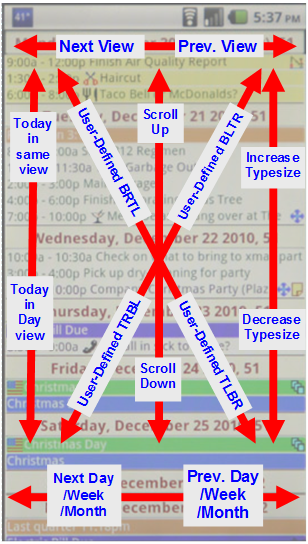
Screen Gestures for Navigation
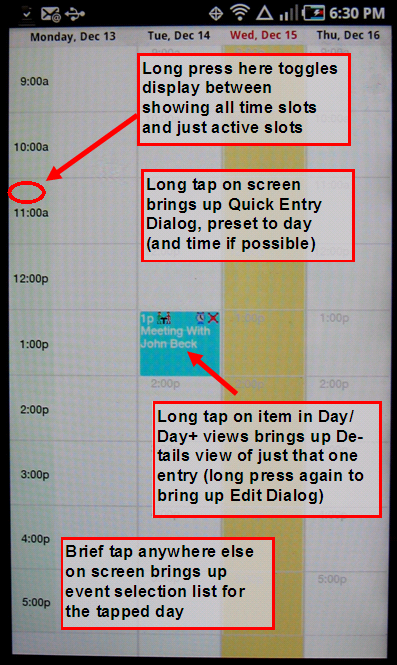
Screen taps for functions
|
| Creating Events |
|
Creating
New Events
|
| Floating Events and Tasks |
What
Are Floating Events
Tasks
View |
| Event Selection List |
Event
Selection List Overview
Popup
Commands
|
| Event Attributes |
Action
Tags
Alarms
Edit
Dialog
Calendars and Categories
Irregular
Repeats
Linking
Meeting
Information
Regular Repeats
System
Icons
User
Icons
Using Colors
Web-Email Links
|
| Using Filters |
|
Using
Filters
|
| Templates |
Quick
Entry Templates - Overview
Call-Action
Templates
Share
Details Template
|
| Menus and Command Bar |
Menu
Items
Command
Bar
|
| Alarms |
Managing
Alarms
Alarm Preferences
|
| Dates, Times and Timezones |
Handling
Dates
Handling
Times
Handling
Timezones
|
| Preferences |
Preference
Sections Overview
Preference
Dialogs
Master
Preference List
|
| Memos |
Using
Memos
Memo
Preferences
|
| Contacts |
Using
Contacts
Contact
Preferences
|
| Syncing |
Syncing Overview
DirectSync to Desktop
AutoSync
|
| Widget |
| Using
Pimlical
Widget
|
| Videos |
| Video Tutorials
|
| For Advanced/Power Users |
File Storage And
Locations
Calendar Database Structures |
Contacts Database Structures
Display Screen
Template
Setting up a Remote Server
|